
An email template that looks perfect in your design tool and broken in Outlook has ruined more Monday mornings than bad coffee. Ask anyone who has ever hit “send” on a campaign to 40,000 subscribers and then watched the replies roll in: “the button is missing,” “the images are stacked weird,” “why is everything purple?” Email rendering is where confident marketers go to be humbled.
The fix is to test HTML email templates before every send. Here’s the uncomfortable truth behind the problem, then the free workflow that saves you from it, plus a starter template you can test right now.
Table of Contents
Why Email HTML Is Stuck in the Past
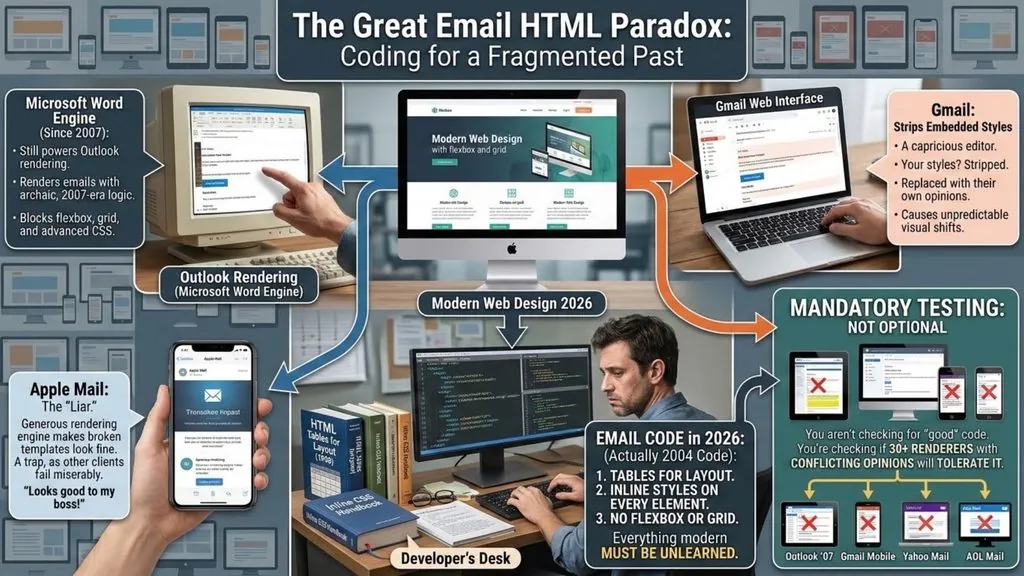
Web browsers standardized years ago. Email clients never did. Classic Outlook for Windows still renders email with Microsoft Word’s engine, a decision dating back to 2007 that developers have been cursing ever since. The new Outlook uses a modern web engine, but millions of corporate users are still on the classic app. Gmail strips out embedded styles it doesn’t like. Apple Mail is generous, which is a trap, because it makes broken templates look fine on the one client your boss uses.
The result: HTML email in 2026 is written like it’s 2004. Tables for layout. Inline styles on every element. No flexbox, no grid, no external stylesheets. Roughly speaking, everything you learned for modern web pages must be unlearned for email.
This is exactly why you need to test HTML email before every campaign. You aren’t checking whether your code is good. You’re checking whether thirty different rendering engines with conflicting opinions will tolerate it.
How to Test HTML Email for Free, Step by Step
Professional suites like Litmus sell monthly subscriptions that make sense for agencies sending daily campaigns. For everyone else, a free way to test HTML email in three stages catches the vast majority of problems.
Stage 1: Instant Visual Check
Before anything sophisticated, paste your template’s HTML into a live preview editor and just look at it. This thirty-second habit catches the embarrassing failures immediately: unclosed table cells that shift your entire layout, missing image paths, broken links, inline styles that never got applied.
A browser-based editor renders your markup exactly as written, so structural mistakes have nowhere to hide. Edit, watch the preview update live, and fix until the skeleton is solid. There’s no faster feedback loop available at any price.
Need something to test HTML email rendering with? This starter template follows every email-safe rule: table layout, inline styles, width attributes, alt text and a fallback font stack.
<!DOCTYPE html>
<html lang="en">
<head>
  <meta charset="UTF-8">
  <meta name="viewport" content="width=device-width, initial-scale=1">
  <meta name="color-scheme" content="light dark">
  <title>Newsletter</title>
</head>
<body style="margin:0; padding:0; background:#f1f5f9;">
  <table role="presentation" width="100%" cellpadding="0" cellspacing="0" border="0">
    <tr>
      <td align="center" style="padding:24px 12px;">
        <table role="presentation" width="600" cellpadding="0" cellspacing="0" border="0" style="width:100%; max-width:600px; background:#ffffff;">
          <tr>
            <td style="padding:32px; font-family:Arial, Helvetica, sans-serif; font-size:16px; line-height:24px; color:#1e293b;">
              <img src="https://placehold.co/536x200" width="536" alt="October product update" style="display:block; width:100%; height:auto; border:0;">
              <h1 style="margin:24px 0 12px; font-size:24px; line-height:30px;">Hello there</h1>
              <p style="margin:0 0 24px;">This is a test email built with tables and inline styles.</p>
              <a href="https://example.com" style="display:inline-block; padding:12px 24px; background:#2563eb; color:#ffffff; text-decoration:none; border-radius:6px; font-weight:bold;">Read more</a>
            </td>
          </tr>
        </table>
      </td>
    </tr>
  </table>
</body>
</html>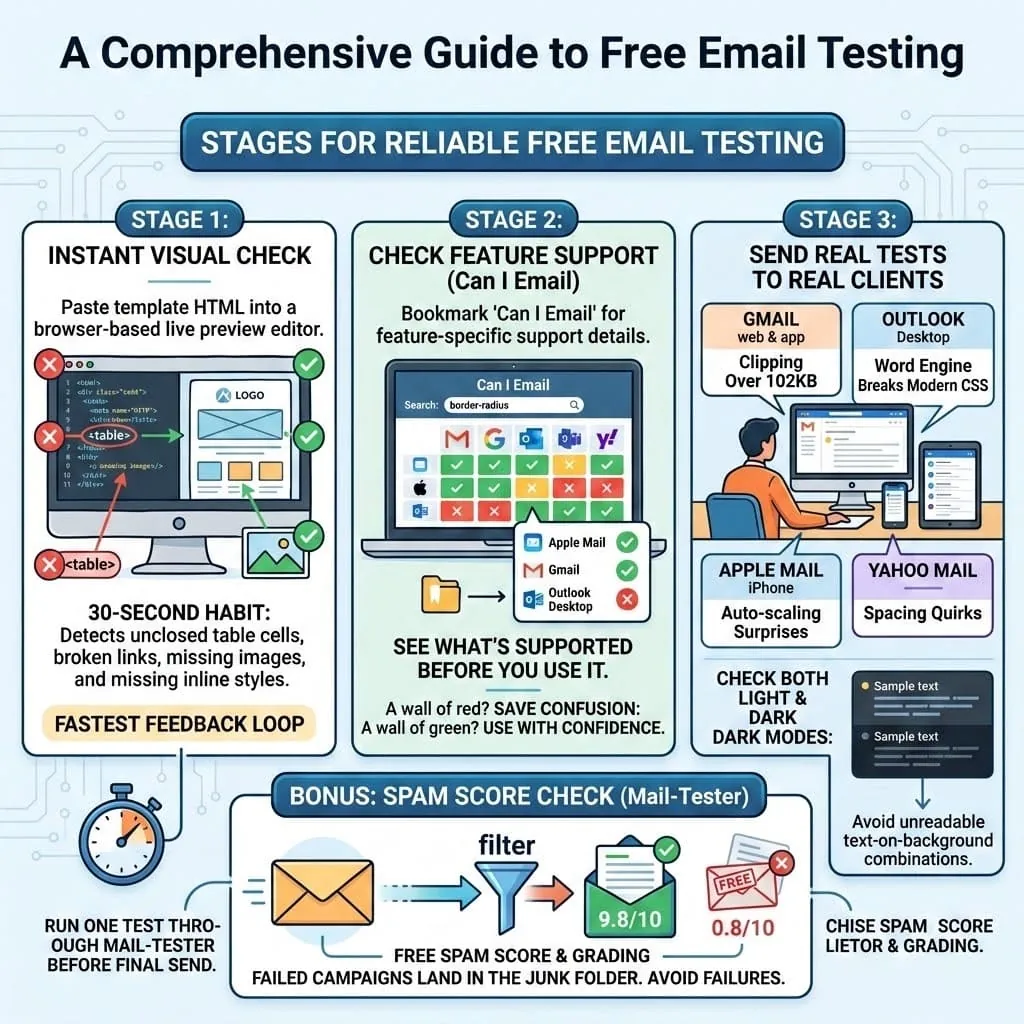
Stage 2: Check Feature Support Before You Use It
Bookmark Can I Email, the email equivalent of the web developer’s “caniuse.” Type any CSS property and it shows you which clients support it, with real percentages.
Considering border-radius for rounded buttons? Supported almost everywhere, except Outlook desktop turns your pill-shaped button into a rectangle. Is that acceptable? Usually yes, that’s called graceful degradation. Planning your whole layout on CSS grid? Can I Email will show you a wall of red and save you a week of confusion.
Stage 3: Send Real Tests to Real Clients
No simulator replaces the real thing. Create free accounts on the clients your audience actually uses, then send a test HTML email to all of them:
| Client | Why it matters | Typical gotcha |
|---|---|---|
| Gmail (web + app) | Biggest audience share | Clips messages over 102KB |
| Outlook desktop | Corporate audiences | Word engine breaks modern CSS |
| Apple Mail (iPhone) | Huge mobile share | Auto-scaling surprises |
| Yahoo Mail | Older demographics | Spacing quirks |
Check each on both light and dark mode. Dark mode adoption keeps climbing, and clients don’t just invert your colors; some partially invert them, which is how brands end up with unreadable gray text on gray backgrounds.
As a bonus before the real send, run one test through Mail-Tester. It’s free and grades your spam score, because a pixel-perfect template that lands in the junk folder is still a failed campaign.
The Mistakes That Break Most HTML Emails
Years of fixing other people’s templates converge on the same short list. Missing alt text on images, so image-blocking clients (Outlook blocks them by default) show empty boxes with no explanation. Widths defined only in CSS instead of HTML attributes on tables, which Outlook ignores. Backgrounds applied with CSS background-image, invisible in half of corporate inboxes. Fonts loaded from Google Fonts, which Gmail and Outlook ignore, and which classic Outlook replaces with Times New Roman when no fallback font is set.
Notice the pattern: every one of these renders fine in a browser preview and dies in specific clients. That’s why the workflow is layered. The live editor catches structure, Can I Email catches compatibility, and real-device tests catch the survivors.
Here is what the safe version of each fix looks like in code:
<!-- Width as an HTML attribute, not only CSS -->
<table role="presentation" width="600" style="width:100%; max-width:600px;">

<!-- Alt text that still makes sense when images are blocked -->
<img src="sale.png" width="600" alt="Autumn sale: 30% off all plans">

<!-- A fallback font stack after any web font -->
<td style="font-family:'Poppins', Arial, Helvetica, sans-serif;">

<!-- A solid background color behind any background image -->
<td style="background-color:#1e293b;">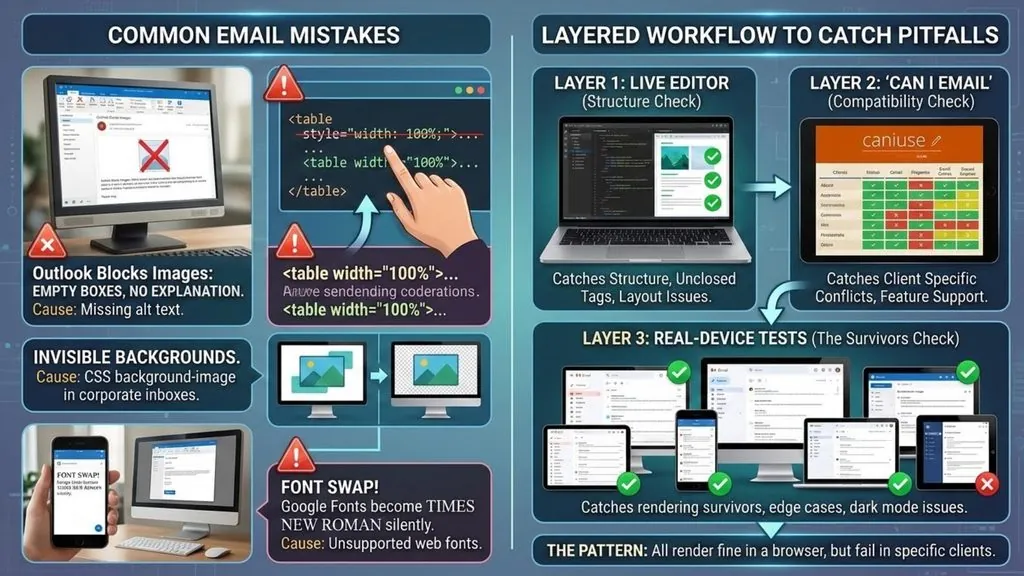
Checklist: Test HTML Email Before You Send
- Preview the HTML in a live editor and fix any broken structure
- Check every CSS property you rely on in Can I Email
- Keep the HTML under 102KB so Gmail does not clip it
- Give every image alt text and an explicit width
- Set width attributes on layout tables
- Add a fallback font stack after any web font
- Send real tests to Gmail, Outlook, Apple Mail and Yahoo Mail
- Check light and dark mode on each client
- Run one test through Mail-Tester for the spam score
- Click every link in the final test
FAQ: How to Test HTML Email
How can I test an HTML email for free?
Preview the code in a free online HTML editor, check CSS support on Can I Email, then send real test messages to free Gmail, Outlook.com and Yahoo Mail accounts. Finish with one Mail-Tester run to check deliverability.
Why does my HTML email look different in Outlook?
Classic Outlook for Windows uses Microsoft Word to render HTML, so it ignores many modern CSS properties such as flexbox, grid, border-radius and background images. Use tables, HTML width attributes and inline styles to keep it stable.
Can I test HTML email without sending it?
Yes, partly. A live preview shows structure and obvious errors instantly, and Can I Email tells you what each client supports. Only a real send shows exactly how each inbox will display it, so always finish with at least one test send.
What size should an HTML email be?
Keep the layout about 600 pixels wide and the HTML file under 102KB. Gmail clips anything larger and hides the rest behind a “View entire message” link.

Test Small, Send Big
The economics here are lopsided in your favor. A broken campaign costs real money: lost clicks, unsubscribes, and the credibility hit of a follow-up “oops, here’s the fixed version” email that everyone recognizes as amateur hour. Taking the time to test HTML email costs maybe twenty minutes.
Twenty minutes against your open rate. That’s the whole trade.
Email HTML will probably still be weird in 2030; the installed base of old clients guarantees it. But weird doesn’t mean unpredictable. Test in layers, respect the ancient rules of tables and inline styles, and your templates will land clean while competitors keep apologizing. For that crucial first stage, paste your next template into our free online HTML editor with live preview and see exactly what your code is really doing before any inbox does.
What’s the worst email rendering disaster you’ve ever sent, or received?